
How to record a PowerPoint presentation
In this article, you'll learn how to record a PowerPoint presentation.
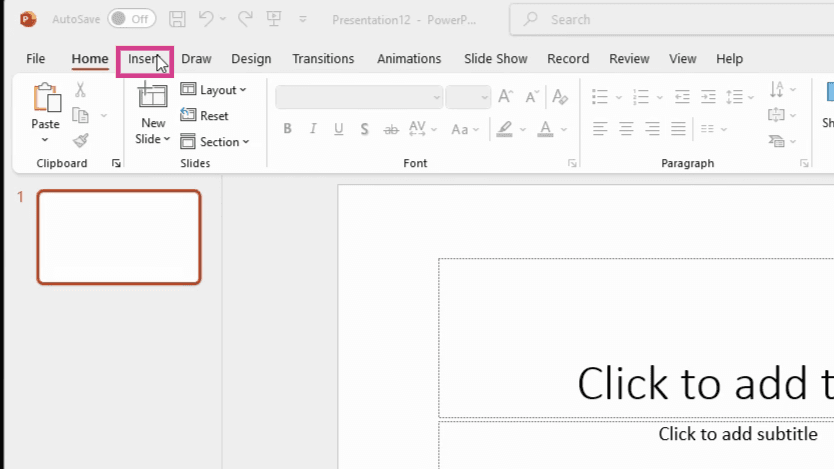
- Start by navigating to the Insert button located in the top toolbar.
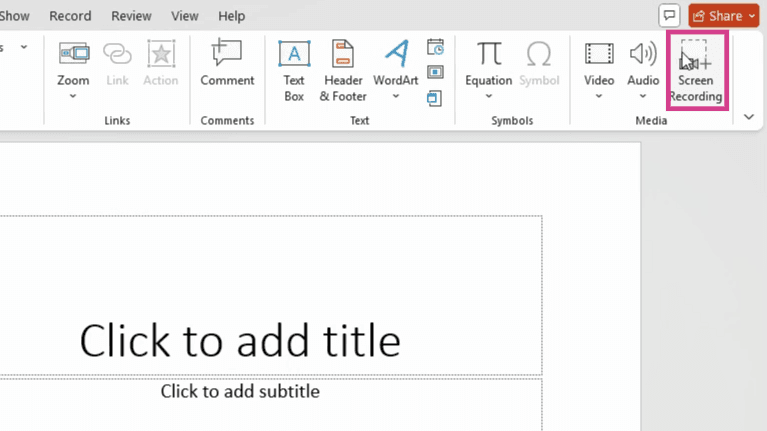
- Next, select the Screen Recording option. You'll find this in the Media section of the drop-down menu.
- Click on it and start recording your screen and your presentation.
- That's it! You're now recording your PowerPoint presentation.
FAQs
1. Where is the Screen Recording option located?
The Screen Recording option is located in the Media section of the drop-down menu that appears when you click on the Insert button.
2. Can I pause the recording?
Yes, you can pause and resume the recording at any time during your presentation.
3. What happens after I finish recording?
After you finish recording, the video will be automatically saved and inserted into your PowerPoint presentation.